For B2B marketing leads
How do you redesign your website without losing your Google rankings?

Websites4 min read
Summary
Plan the move before you design anything. List every page on your current site, keep the content that ranks, send each old address to its closest new page with a permanent (301) redirect, test every redirect on launch day, then check Search Console every week for 30 days. A small dip after a move is normal; a drop that lasts usually means a redirect or a page is wrong.
- Rankings belong to pages and addresses. Change them without a plan and you lose what they’d earned.
- Map every old page to its closest new page, never all of them to the homepage.
- Keep the content that ranks, even if the design around it changes completely.
- Test every redirect on launch day, then watch Search Console weekly for the first 30 days.
A new website shouldn’t cost you the search traffic you already have. When it does, it’s rarely bad luck. It’s usually because the move wasn’t planned before the design started.
It can be expensive when it goes wrong. One CMO, reviewing their SEO agency on Clutch, said they’d “lost 50% of our organic sessions from a disastrous re-platform”. Another buyer on Reddit described losing “about 8k and 2 months” on a rebuild before starting again.
Here’s how we plan it on every site we build.
Why do websites lose rankings in a redesign?
Google ranks pages, at addresses. A redesign tends to change both. The usual causes:
- Old addresses stop working. Pages move or get renamed, and nothing tells Google or the people with old links where they went.
- Content that ranked gets cut. A page that brought in searches is merged, shortened or dropped because it didn’t fit the new design.
- Everything redirects to the homepage. It looks tidy, but Google says sending many old addresses to one unrelated page, such as the homepage, can be treated as a “soft 404”: a page that no longer exists.
- The new site is hidden by mistake. A “noindex” setting from the staging site is left on at launch.
- Nobody watches after launch. Problems that would take ten minutes to fix in week one are found months later.
Google’s own guide to moving a site with URL changes covers the same ground in more detail. Two points from it are worth knowing before you start. Permanent (301) redirects don’t lose a page’s ranking value, so a well-mapped move isn’t a penalty. And some movement is expected: Google says rankings can fluctuate while it recrawls the site, and for a medium-sized site it can take a few weeks or more before the new addresses fully replace the old ones.
How do you keep your rankings through a redesign?
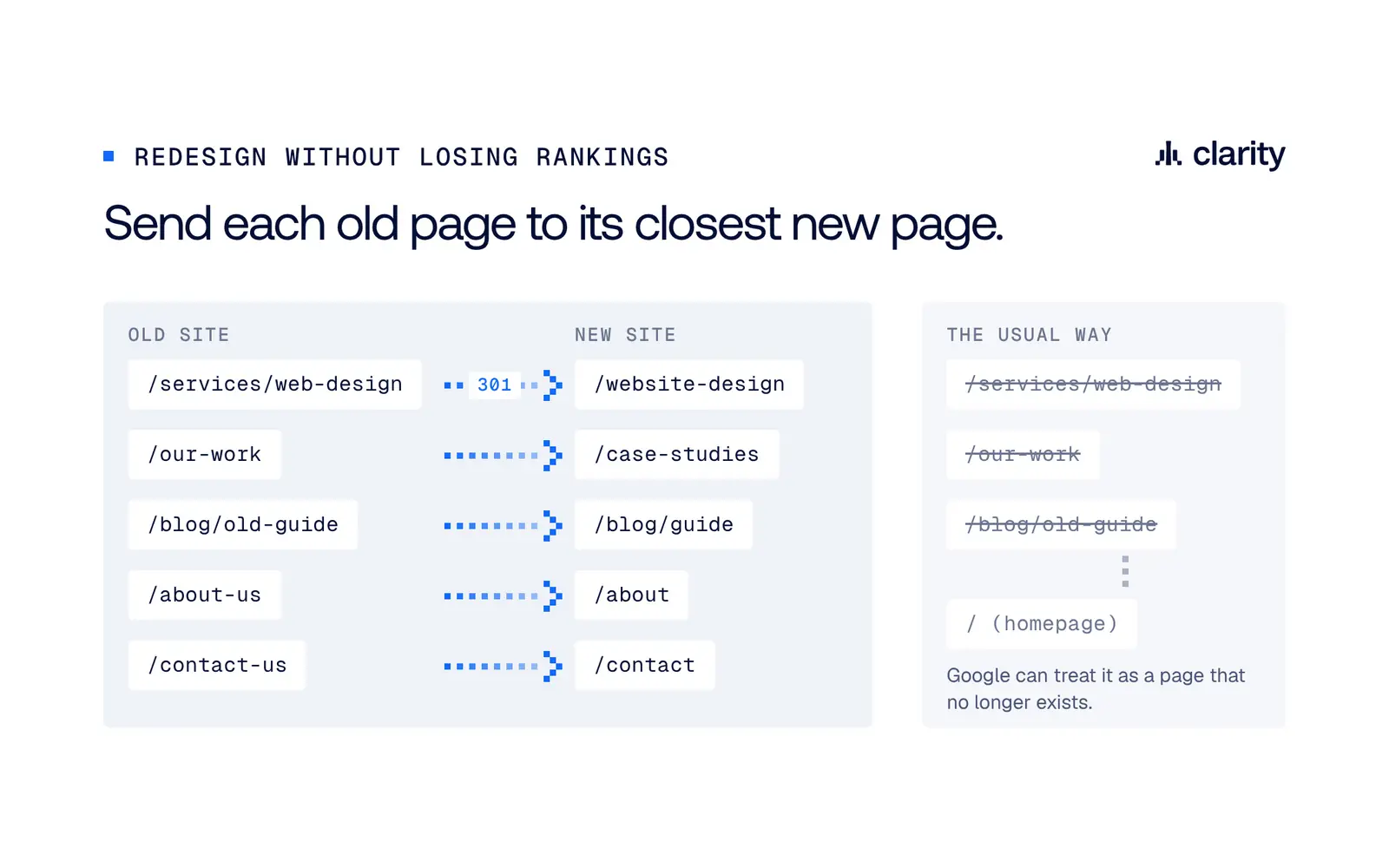
- List every page on the current site, before design starts. Combine the sitemap, a crawl, Search Console’s Pages and Performance reports (the last 16 months of clicks and impressions), the pages other sites link to most, and any hidden or CMS pages. Save each page’s title and description as your baseline.
- Map each old page to its closest new page. One line per page. Never send them all to the homepage. Pages with clicks or links and no new equivalent need a decision: keep the content somewhere on the new site, or accept the loss knowingly.
- Keep what ranks. The design can change completely. The content that earns searches, and the words it ranks for, should carry across.
- Set up permanent (301) redirects from the map, and test every one on a preview of the new site before launch.
- On launch day, check the basics. The new site can be crawled, nothing is set to “noindex”, the sitemap lists every page, and every redirect returns the right page. Submit the sitemap in Search Console and Bing Webmaster Tools, and request indexing for your most important pages.
- Watch the first 30 days. Twice a week for two weeks, then weekly: new “not found” pages, pages with redirects, and clicks and impressions against your baseline. Any old page with clicks or links that now shows “not found” gets a redirect the same day.
What should you check, and when?
| When | What to check | Why it matters |
|---|---|---|
| Before design | Every current page, its clicks, links, title and description | You can’t protect what you haven’t listed |
| Before launch | The page map, signed off; every redirect tested on a preview | Mistakes are cheap to fix before the switch |
| Launch day | No “noindex”, sitemap submitted, redirects live, key pages requested | Google finds the new site and the old addresses straight away |
| First 30 days | Not-found pages, redirects, clicks and impressions vs the baseline | A drop caught in week one is a small fix |
| A year on | Redirects still in place | Google says to keep them generally at least a year, so it can pass every signal across |
What about AI search?
The same work covers it. ChatGPT, Perplexity, Gemini and Google’s AI answers lean on search indexes and on what your pages say, so pages that keep their addresses, content and rankings keep doing that job too.
Two extra checks are worth doing at launch. Make sure your robots.txt doesn’t block the AI search crawlers, and keep key facts (what you do, who for, how to get in touch) in the page text, because most AI crawlers read a page’s HTML without running its JavaScript.
What should you ask whoever builds your new site?
- How will you list every page on our current site, and who signs off the page map?
- Which pages bring in search traffic today, and how will you keep them?
- How will you test the redirects, and when?
- Who checks Search Console after launch, and for how long?
If the answer to any of these is vague, the rankings are at risk. We plan every move this way, whether it’s a services firm or a GTM agency changing platform.
Quick answers
- Will we lose our Google rankings if we redesign our website?
- Not if the move is planned properly. Map every page on your current site to its closest new page, keep the content that ranks, and set up redirects so old links and rankings carry across. A small dip after any move is normal; a lasting drop shouldn’t happen.
- How long does it take for rankings to settle after a redesign?
- Expect some movement in the first few weeks. If a page that was mapped and redirected is still well down after about 30 days, check that page first: the redirect or the content match is usually wrong.
- Should we change platform at the same time, for example off WordPress or HubSpot?
- You can, as long as the move is planned the same way. A platform change usually changes more page addresses than a redesign alone, so the page map matters even more.
- How long should redirects stay in place?
- At least a year, and ideally for good. Old links on other sites keep sending people and search engines to the old addresses long after launch.
Naz Hashem is the founder of Clarity Design Studio (designwithclarity.co), a Melbourne-based brand and website studio for B2B companies. The studio has worked with 40+ B2B companies in Australia, the US, UK and Europe, including GTM agencies and Clay partners.
What’s your next move?
Starting costs nothing.
Waiting costs you bigger clients.
Fill in a short form about your company. We’ll review where your current site loses buyers and design your new homepage, free. If you like it, we build the rest. If not, you don’t pay a thing.
Don’t pay a single dollar unless you’re 100% satisfied
“It felt like I was partnering with an expert not only in web design and development, but with a product marketer with deep experience in my industry. Plus, in my opinion, the pricing is an absolute steal!”