For B2B marketing leads
Moving your website off HubSpot: how do you keep your leads, and get more of them?

Websites5 min read
Summary
You can move your website off HubSpot without losing a single lead, as long as you decide three things before you move: where each form’s submissions will go, how visits will be tracked, and where every old page redirects. Then use the move to fix what stopped the site converting: a homepage that reads like a directory, calls to action nobody understands, and no clear way to book a call.
- Moving the website doesn’t mean leaving HubSpot’s CRM. You can keep it, or move everything to another CRM such as Salesforce.
- List every form and what happens after it’s submitted, so each one still works on day one.
- Tracking only works on the new site if you install it there. It doesn’t move by itself.
- A move is the cheapest moment to fix the story, the calls to action and the booking path.
A lot of B2B companies start their website on HubSpot because the CRM is already there. Then something changes: the company moves its CRM, the marketing team wants a builder it can actually work in, or the site simply stops bringing in leads.
The marketing lead at a logistics and supply-chain company of several hundred people described exactly that on a call with us. Their site was “hosted in HubSpot”, the company was “potentially moving away from HubSpot and consolidating everything in Salesforce”, and paid ads were about to start. Their conclusion:
“If we are gonna do a website migration or [a] move away from HubSpot, like, might as well make it really good.”
They’re right. Here’s how to move without losing leads, and how to come out of it with a site that brings in more.
Do you have to leave HubSpot completely?
No. Moving the website and moving the CRM are two separate decisions:
- Move the website, keep HubSpot as your CRM. The site moves to Webflow, Framer or custom code, and form submissions and visitor data still go to HubSpot.
- Move the website and the CRM. The site moves, and leads go into another CRM such as Salesforce.
Which one you choose changes how the forms and tracking are wired, so decide it before the build starts.
How do the options compare?
| Stay on HubSpot CMS | Move the website, keep HubSpot CRM | Move the website and the CRM (e.g. Salesforce) | |
|---|---|---|---|
| The right call when | The team is happy editing in HubSpot and the site converts | You want a different builder but HubSpot runs your sales and marketing | The company is consolidating everything in another CRM |
| Forms | HubSpot forms, as now | Embed HubSpot forms on the new site, or send your own forms’ submissions to HubSpot | Forms that create leads in the new CRM (in Salesforce, Web-to-Lead) |
| Tracking | Added automatically on HubSpot pages | Install the HubSpot tracking code on the new site | Set up tracking for the new CRM and your analytics |
| Watch out for | A site that still doesn’t convert after a redesign | Forms and tracking that worked before but weren’t added to the new site | Follow-up emails and lead routing that lived in HubSpot and need rebuilding |
What has to keep working when you move?
Three things carry your leads, and none of them moves by itself.
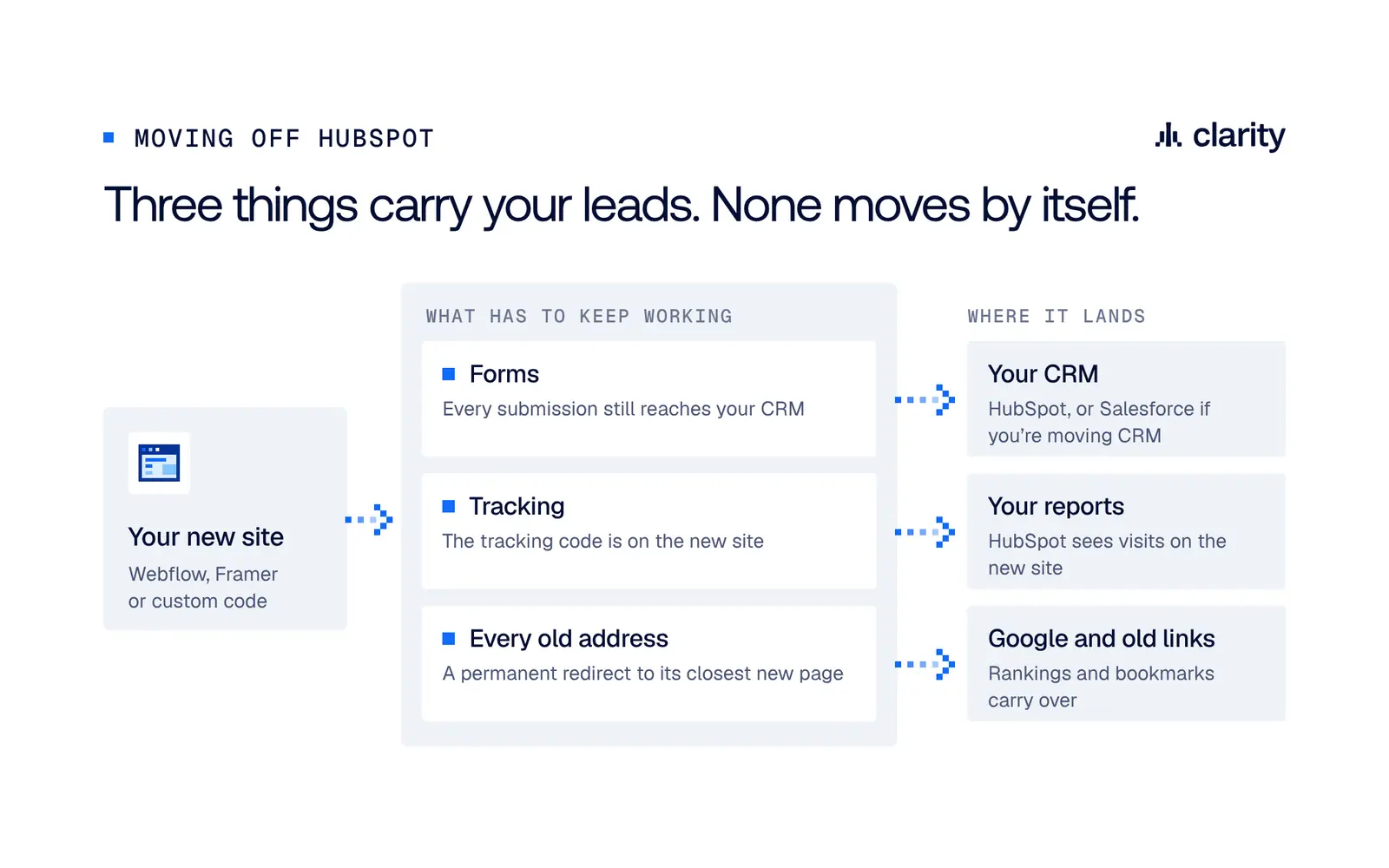
- Forms. HubSpot forms can be embedded on pages outside HubSpot, and edits you make in HubSpot show up on the live form. If you’d rather use the builder’s own forms, HubSpot can collect submissions from non-HubSpot forms, but only while its tracking code is on the page, and it can record a partial submission each time a visitor hits submit with a field missing. A developer can also send submissions through HubSpot’s Forms API. If leads are going to Salesforce instead, its Web-to-Lead feature creates leads from a website form.
- Tracking. HubSpot adds its tracking code to pages it hosts. On any other site you install it yourself, and if you host a whole domain elsewhere you also add that domain in HubSpot’s settings. Without it, HubSpot can’t see visits on the new site.
- Every old page’s address. Each page on the HubSpot site, including landing pages and blog posts, needs a permanent redirect to its closest new page. Most builders, Framer included, let you add redirects in the site settings. We’ve written up how to keep your rankings through a redesign.
Before launch, list every form on the current site and what happens after someone submits it: who gets notified, where the lead is routed, which follow-up email goes out. Then submit each form on the new site and check the lead arrives where it should. It’s the step most often skipped, and the one that loses leads quietly.
How do you get more leads out of the move?
A move is the cheapest moment to fix why the site wasn’t converting, because every page is being rebuilt anyway. The same marketing lead listed what was wrong with their site, and it’s a list we hear often:
- The homepage was a directory. “The home page kinda serves more as, a directory. Where it just has a bunch of links on the home page.” Lead with one clear story about what you do and for whom, and let the other pages carry the detail.
- Too many pages. They thought the site had “potentially too many pages”. Merge the ones that say the same thing, and redirect the old addresses to the merged page.
- Calls to action that don’t say what happens. Going through the site together, the buttons weren’t clear about what happens next, and they called them “a little wordy”. Say what the visitor gets (“Book a demo”, “See pricing”) rather than a slogan.
- A sales-led product that looked self-serve. Buyers had to book a demo before they could start, but the site didn’t make that the obvious next step. If a call comes first, make booking it the main action on every page.
- No dedicated booking page. They liked pages where a visitor gives a name and email and is asked to pick a time straight away, with proof and a short explanation of the demo alongside. Save the details before the calendar opens, so sales can follow up with anyone who doesn’t book.
- Paid traffic about to arrive. With Google and LinkedIn ads starting, their words were “I wanna make sure every dollar counts.” Get the homepage and booking page right before the ads go live, not after.
What should you ask whoever builds the new site?
- Which platform suits how our team will edit the site, and why?
- How will every form be connected to our CRM, and how will you test that each one works?
- How will HubSpot (or our new CRM) and our analytics track visits on the new site?
- How will you list every current page, and who signs off the redirect map?
- What will you change so the new site converts better, not just looks newer?
If you’re planning a move off HubSpot, the quickest way to see what the new site could do is to see its homepage first.
Quick answers
- Can we keep using HubSpot forms after we move the website to Webflow, Framer or custom code?
- Yes. HubSpot forms can be embedded on pages hosted outside HubSpot, and changes you make to a form in HubSpot show up on the live form automatically. You can also use your own forms and send the submissions to HubSpot.
- Will HubSpot still track our visitors after the move?
- Only if you install the HubSpot tracking code on the new site. It’s added automatically to pages hosted in HubSpot, but not to pages hosted anywhere else.
- Can website leads go straight into Salesforce instead?
- Yes. Salesforce can create leads from a form on your website (its Web-to-Lead feature), and the routing is then set up in Salesforce. Decide this before the build, so every form on the new site is wired to the right place.
- Will we lose our Google rankings when we move off HubSpot?
- Not if the move is planned. List every page on the current site, map each one to its closest new page, set up permanent redirects and test them on launch day. Most website builders let you add redirects in the site settings.
- How long does a website move and redesign take?
- Most websites take about 6 weeks from kick-off to launch, and brand work adds 2–4 weeks before that. The biggest factor is how quickly you can review and sign off each stage.
Naz Hashem is the founder of Clarity Design Studio (designwithclarity.co), a Melbourne-based brand and website studio for B2B companies. The studio has worked with 40+ B2B companies in Australia, the US, UK and Europe, including GTM agencies and Clay partners.
What’s your next move?
Starting costs nothing.
Waiting costs you bigger clients.
Fill in a short form about your company. We’ll review where your current site loses buyers and design your new homepage, free. If you like it, we build the rest. If not, you don’t pay a thing.
Don’t pay a single dollar unless you’re 100% satisfied
“It felt like I was partnering with an expert not only in web design and development, but with a product marketer with deep experience in my industry. Plus, in my opinion, the pricing is an absolute steal!”