For B2B founders and marketing leads
We want to use AI for content and design, but don’t have clear brand rules. Who should build them first?

BrandUpdated 10 min read
Summary
Hire a brand designer first, not a content agency, a prompt specialist or another AI tool. AI can only follow brand rules that a person has designed. So whoever builds your AI brand guidelines should make the brand first (or already have made it). Then they write the rules from it in a form your AI can follow. If you already have a brand and a website that uses it well, you can write the rules yourself.
- No clear brand yet? Hire someone to design it, and make the AI-ready rules part of the same job.
- Already have a brand? Extract the rules from your website, not from memory or a PDF.
- AI brand guidelines need four layers: exact values, your brand’s own devices, templates and finished examples.
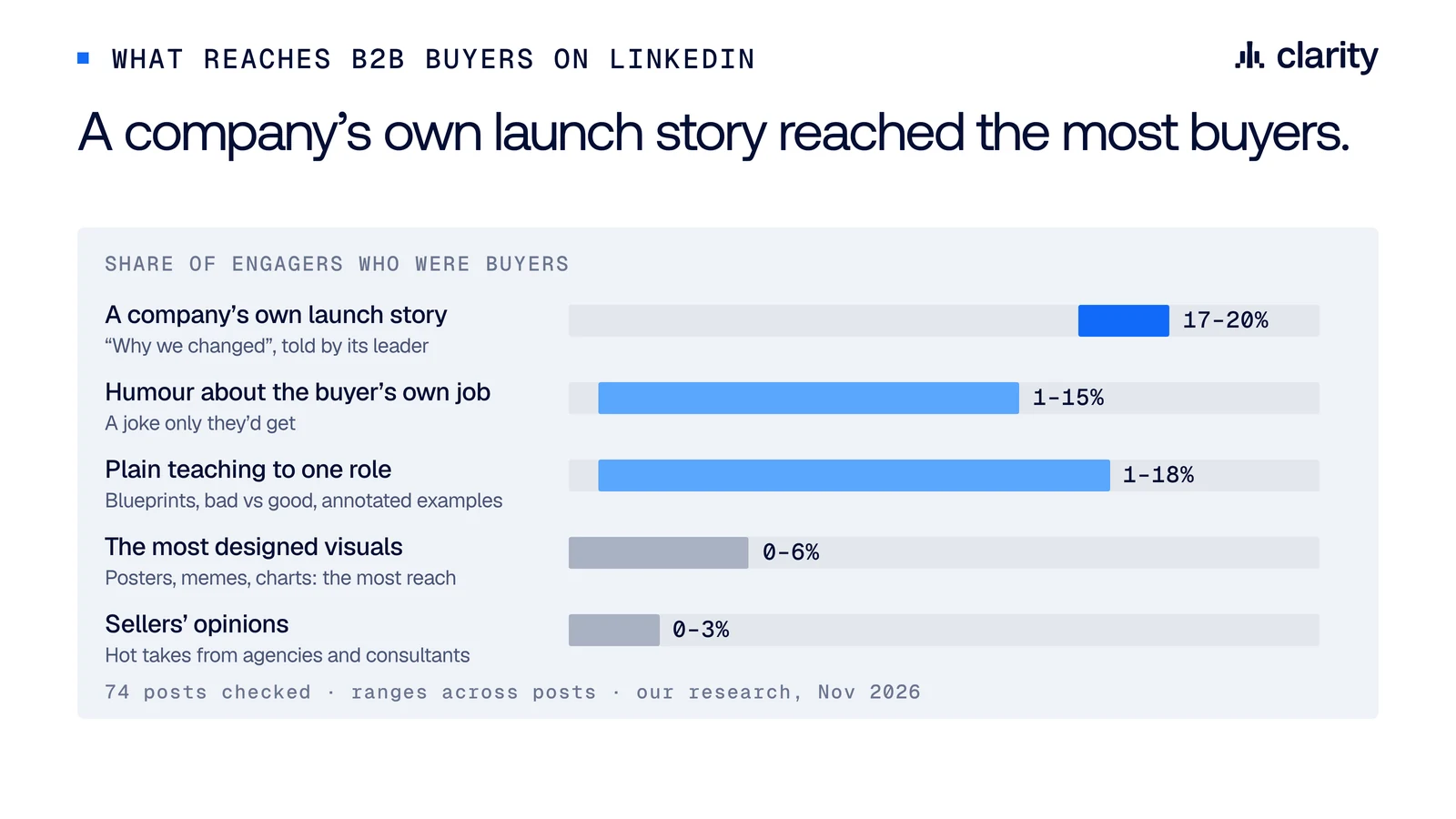
- Build templates from the post types that reach your buyers. In our research, a company’s own launch story reached the most: 17–20% of the people who engaged.
Contents
- Who should we hire to build our brand rules first?
- What happened when Wahoo did this?
- Why does AI-made content and design all look the same?
- What do clear brand rules (AI brand guidelines) look like?
- Why start from the website?
- How do you turn your website into brand guidelines AI can use?
- How do you train your brand rules on posts that already work?
- What did we find when we studied posts that reach B2B buyers?
- Why isn’t engagement the whole story?
- Why is LinkedIn worth the effort?
- Can someone set this up for us?
- Quick answers
Most B2B teams now make some of their content and design with AI. Ask ChatGPT or Claude for a LinkedIn graphic and you’ll get something in seconds. It will also look like everyone else’s.
That’s not because the tools are bad. It’s because they have no brand rules to follow: what people now call AI brand guidelines. So the order matters: rules first, AI second. The question is who builds the rules.
I run a brand and website studio, so I’m not neutral here. Here’s how I’d decide who to hire, and how we build the rules. Then what we learnt from the posts that reach B2B buyers, and what happened when one client put it to work.
Who should we hire to build our brand rules first?
It depends on whether you have a brand to write rules for.
- You don’t have a clear brand yet (a DIY logo, a template site, colours someone picked in an afternoon). Hire a brand designer or studio to make one. Original brand work is the one job AI can’t do for you, because it can only copy. When you hire, make the AI-ready brand rules and templates part of the brief, not an afterthought.
- You have a brand, and a website that uses it well. You don’t need to hire anyone to start. Extract the rules from your site with the steps below, or have someone do it for you if you’d rather not spend the time.
- You have a brand, but only a guidelines PDF. Start with the website. A PDF shows the logo on a white page. The site shows how the brand behaves across ten different sections, and that’s what AI needs to see.
Who not to start with:
- A content agency. They’ll make posts, but they’ll make them in their house style unless you give them rules.
- A prompt specialist or a new AI tool. Better prompts on top of no brand still give you the average.
- Your team, from scratch, in a chat window. You’ll get rules for a brand that doesn’t exist yet.
- An AI brand guidelines generator. It’s quick, and fine for a side project. But it can only produce guidelines for the average brand it imagines from a few inputs, and AI then scales that average. A generator can write the rules down. It can’t design what the rules are about.
What happened when Wahoo did this?
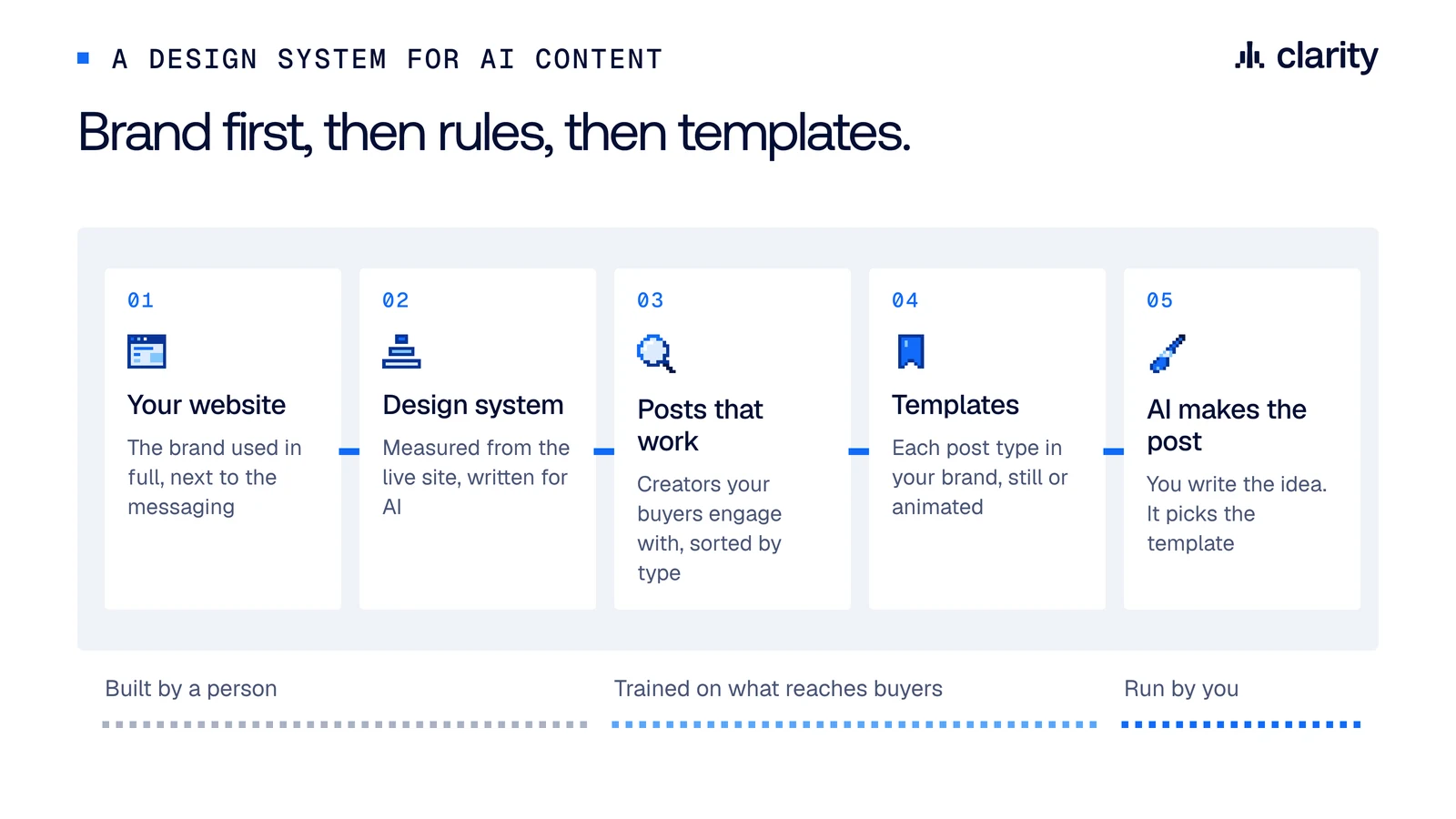
Wahoo Services is a fractional GTM function for B2B SaaS, run by Kieran Hooper-Warren. We designed and built Wahoo’s brand and website first. Then we extracted its brand rules from the live site. It was then trained on the top-performing posts in his space, and Kieran makes his LinkedIn visuals with it in Claude.
Why does AI-made content and design all look the same?
AI gives you the most likely answer. Ask for “a clean B2B LinkedIn graphic” and you get the average of every clean B2B graphic it has seen.
If you give it references instead, it copies the references. That’s someone else’s brand, scaled.
The fix is the same one that works in outbound. Good outbound doesn’t scale raw AI output. It scales AI trained on messages a person has already approved. Content is no different: AI needs a brand a person made and signed off, written down in a form it can follow.
As more companies make content from the same generic inputs, they start to look identical. A brand that’s actually yours becomes the edge.
What do clear brand rules (AI brand guidelines) look like?
AI brand guidelines are your brand guidelines written so an AI tool can follow them. That might be ChatGPT, Claude, Gemini or a design tool with AI built in. You’ll also hear them called brand rules for AI or an AI design system. Usual brand guidelines are written for people: a PDF with the logo, the palette and a few do’s and don’ts. Guidelines AI can read need four layers:
- Exact values: your colours (and how much of each), fonts and sizes, spacing, corners.
- Brand devices: the graphic ideas only you use. A pattern, an illustration style, a way of drawing diagrams.
- Templates: a layout for each type of post you publish, with the rules for when to use it.
- Examples: finished posts that show the AI what “right” looks like.
The tools have caught up. Most AI tools can follow rules from a file, and some now store them for you: Claude Design, for example, saves your colours, typography, components and layout patterns and applies them to every new design (Claude Help Center).
So the tool isn’t the hard part any more. The rules are.
Why start from the website?
Because it’s the richest example of your brand you own.
A well-made website uses every part of the brand in context. The colours sit on real backgrounds and the type appears at every size. The brand’s own graphics do real jobs in a hero, a process section, a results band. It also holds the messaging and the tone. So the system carries what you say as well as how it looks.
Those bespoke visuals are exactly what AI needs to learn from. Start anywhere else and you’re starting from scratch, with no reference for how the pieces fit together. That’s where most DIY design systems fall apart. The LinkedIn template doesn’t look like the website, and the deck doesn’t look like either.
The site does more than feed the AI, too. It’s a living record of what you sell and why buyers pick you, and it’s what new hires read first.
How do you turn your website into brand guidelines AI can use?
Extract them from your website, and measure. Don’t describe the brand from memory. This is the process we use:
- Render every page on desktop and mobile, scrolling each section so lazy-loaded content appears.
- Count the colours by how much they’re used, not by what the brand book says. You’ll find the true ground, ink and accent, and the colours that only appear once.
- Record every font with its real settings: family, weight, size, line height and letter spacing at each level.
- Catalogue the brand devices and save the originals: patterns, illustrations, diagrams drawn in code, buttons.
- Keep the copy: the headline lines, the claims, the words the brand uses and avoids.
- Write it into one file the AI reads, with each rule, why it’s there, and what not to do. Then test it on a few posts and fix what comes out wrong.
Measuring catches things memory doesn’t. On one client’s site, the brief described the brand as “pale lime with a dotted grid”. Measured, the page ground was a neutral grey with the dotted grid, and the pale lime appeared only in the social share image. An AI told “pale lime” would have got every post slightly wrong.
How do you train your brand rules on posts that already work?
Brand rules tell AI how your posts should look. It doesn’t tell it which posts to make. For that, study what already works in your space:
- Find the creators your buyers engage with. Tools like Jungler search LinkedIn creators by who engages with their posts (job, seniority, company size). Follower count alone doesn’t tell you that.
- Pull their best posts. Apify can pull a creator’s back catalogue with the images, carousels and video, for a few dollars per thousand posts.
- Check who engaged. For the posts that matter, look at whether the people engaging are your buyers or other sellers. (Jungler tags every engager; with Apify you look each one up.)
- Sort them by type and visual: launch story, framework, data, comparison, proof, and so on.
- Turn the best types into templates in your brand, in a few colour variations, as stills or animated GIFs.
- Give the AI the library, so you write the idea and the AI picks the template that fits and makes the post in your style.
What did we find when we studied posts that reach B2B buyers?
We tagged 238 LinkedIn posts from B2B studios, consultants, creators and in-house leaders by post type and visual. Then we checked who engaged on 74 of them. Here’s what stood out.
- A company’s own launch story reached the most buyers. A firm launched a new website, brand or product, and its leader told the story of why they changed. On those posts, 17–20% of the people who engaged were buyers. They were mostly the firm’s own industry: peers, partners and clients. Those are the same people who’d buy from them.
- “Why we changed” beat “we’re live” by a mile. Launch posts that told the story got 5–20 times the engagement of plain “our new website is live” posts. Those plain posts came from a company page or staff.
- Sellers’ opinions reached sellers. Hot takes from agencies and consultants drew 0–3% buyers.
- The most designed visuals got the most reach and the fewest buyers. Big framework posters pulled 900–2,000 reactions and comments. Across posters, memes and data charts, 0–6% of engagers were buyers where we measured.
- Plain, specific teaching written to one role did best of the rest, with very little design: a sitemap blueprint, a bad-versus-good comparison, an annotated set of homepages (10–18% buyers). Generic teaching to “anyone in marketing” fell to 1–3%.
- High engagement isn’t buyer engagement. One firm’s posts drew around 100 comments each, and about 1% came from its buyers.
What that means for your template library: build the launch-story template before the poster. Make room for plain teaching visuals and proof. Use the big designed formats for reach when you want it, and don’t expect them to fill your calendar.
Why isn’t engagement the whole story?
Because you only see the people who click. You don’t see who saved the post, who sent it to their boss in a DM, or who read every word and said nothing. In our research, the senior buyers who did engage were nearly all reacting, not commenting.
So treat buyer share as a direction, not a score. Use it to choose which post types get a template. Then judge the system by what happens next: calls booked, who’s on them, and what they say they saw.
Why is LinkedIn worth the effort?
Because so few people post. The last figure LinkedIn shared, from 2019, was about 3 million people sharing content each week, out of roughly 310 million monthly users: about 1%. It’s old, but the picture hasn’t changed much. Almost everyone on LinkedIn is reading, and very few are publishing.
That’s leverage. A founder who posts well, consistently, in a look buyers recognise, is competing with very few people for a lot of attention. Clear brand rules are what make “well” and “consistently” possible at the same time.
Can someone set this up for us?
Yes. We do it as a one-off project. We extract your brand rules from your site and research the posts that reach your buyers. We build a template for each type in your brand, still and animated. Then we set it up in your AI tool so your team can run it. You bring the idea; the AI picks the template and makes the post.
You keep everything. The rules and templates live in a GitHub repo. A brand portal holds your logo in every colour, the palette, type, tone of voice and every file to download.
If you don’t yet have a brand worth scaling, we start there.
Quick answers
- Can’t we just ask ChatGPT or Claude to make our brand guidelines?
- You can, and you’ll get guidelines for an average brand. AI can organise and apply a brand. It can’t make one that’s original, because it can only work from what it has seen. Make the brand first, then have AI help write it down.
- What’s the difference between brand guidelines and AI brand guidelines?
- Usual guidelines describe the brand for people. AI brand guidelines are written so a tool can follow them. They hold exact values, rules for when to use each part, templates for each type of post, and finished examples.
- Can an AI brand guidelines generator build our brand rules?
- It can write rules down, and it’s fine if the brand doesn’t need to stand out. It can’t design the brand the rules describe: it fills the gaps with the most common answer. Use one to format rules for a brand you already have, not to make the brand.
- What should social media brand guidelines include for AI?
- The same four layers, with social in mind. Exact values, your brand’s own devices, and a template for each post type you publish (launch story, framework, proof, comparison). Then finished posts as examples. Add the platform sizes and the parts of the image each platform covers, so the AI keeps text out of them.
- How do you create brand guidelines if you’re starting from nothing?
- Design the brand first, with a designer: positioning, identity, then the website. Write the guidelines from what was designed, not before it. Guidelines written first describe a brand nobody has made yet.
- Do we need a new website first?
- No, if your current site already uses your brand well. Extract from that. If the site is a template or out of date, the system will copy its problems, so fix the brand and the site first.
- Which tools do you use?
- ChatGPT, Claude or Gemini to make the posts, whichever your team already uses. Wonder or Figma for the templates. Jungler to find the creators your buyers engage with and see who engaged. Apify to pull posts and visuals.
- Can the posts be animated?
- Yes. Each template can be a still or an animated GIF, which LinkedIn plays on a loop in the feed.
- Does it only work for LinkedIn?
- LinkedIn is where we start, because that’s where B2B buyers read most. The same system works for landing pages, decks, launch videos and event material, because it starts from the brand, not the platform.
- How do we know if it’s working?
- Look past reactions. Track calls booked, who’s on them and what they mention. Check buyer share on a few posts a month to decide which templates to keep.
Naz Hashem is the founder of Clarity Design Studio (designwithclarity.co), a Melbourne-based brand and website studio for B2B companies. The studio has worked with 40+ B2B companies in Australia, the US, UK and Europe, including GTM agencies and Clay partners.
What’s your next move?
Want brand rules your AI can follow?
We build them from your brand.
We extract your brand rules from your site and build templates from the posts that reach your buyers. Then we set it up in your AI tool.
“It felt like I was partnering with an expert not only in web design and development, but with a product marketer with deep experience in my industry. Plus, in my opinion, the pricing is an absolute steal!”